
How to read the leaderboard?
Who can view the leaderboard?
All registered users can view the leaderboard while they are logged-in.
Where do I find the leaderboard?
You can access the Games2gether leaderboard from the navigation bar. The navigation bar is located at the top of each page on the front end. On the right-hand side, you’ll see your avatar, username, and G2G points total.
Click on your G2G points. This will take you to the leaderboard.
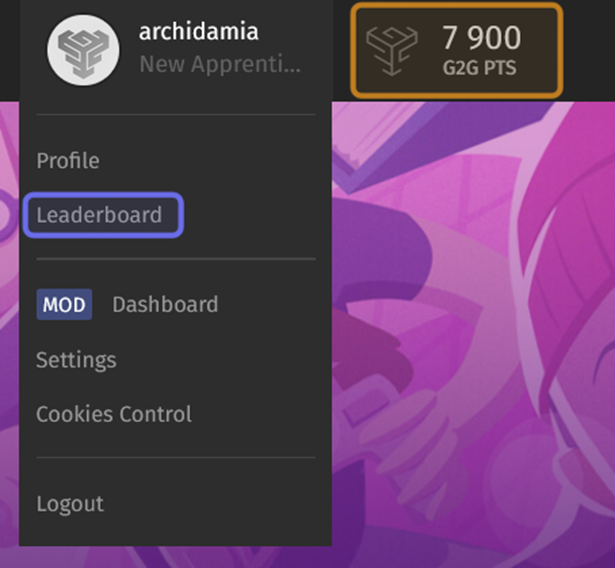
The right-hand side of the navigation menu is pictured above. The user’s G2G points total is highlighted in yellow. The user menu is expanded and “Leaderboard” is highlighted in purple.
You can also find the leaderboard by clicking on your avatar. This will open the User Menu. Select “Leaderboard” from the User Menu to view the leaderboard.
How do I read the leaderboard?
Your details are located above the leaderboard. Your ranking is to the left of your username and avatar. On the right are two columns. The left column displays your score, which is the total number of G2G points you have earned. The right column displays the total number of badges that you have unlocked.
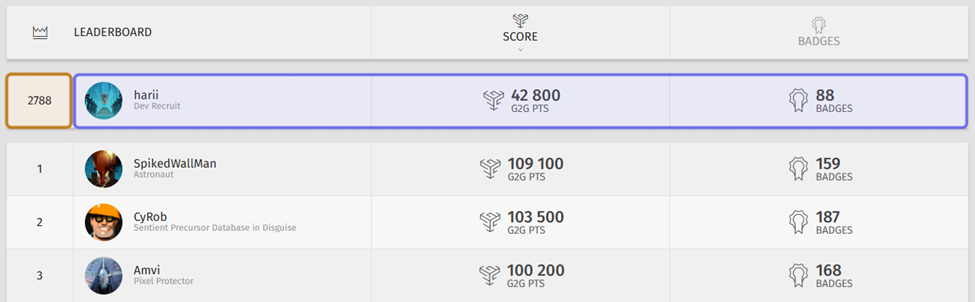
The top of the leaderboard is shown above. The ranking of the logged-in member is highlighted in yellow. Their username, score, and unlocked badge total are highlighted in purple.
The top 15 are located below your stats. By default, the leaderboard ranks members by score.
Click “Badges,” the title of the rightmost column, to instead rank members by total number of unlocked badges. The member who has earned the most badges will now be in first place. This may not be the member with the highest score.
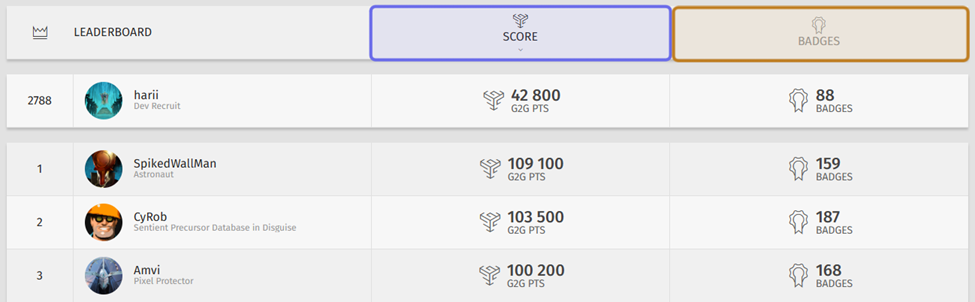
The top of the leaderboard is shown above. The “Score” column header is highlighted in purple. The “Badges” column header is highlighted in yellow.
If you click “Badges” a second time, the leaderboard will be re-sorted to show the member with the fewest unlocked badges at the top of the list. The ranking on the left will reflect that the lowest ranked member is displayed first.
Click on “Score” to re-sort the leaderboard by G2G point total. If you click on “Score” a second time, the leaderboard will be re-sorted to show the member with the lowest number of G2G points at the top. The ranking displayed next to a user’s name will reflect that the lowest ranked member is displayed first.
If there are more than 15 ranked members, pagination will appear above and below the leaderboard. Use the arrows or click on a page number to view other pages. Each page will display up to fifteen members.