
What is a “Restriction Level”?
Restriction Levels control users’ access to specific content on the Games2gether platform. Devs and Admins can set the Restriction Level for certain elements in the back office, such as a forum or CMS block.
For instance, you can create a forum that is only visible to the “Mod” Restriction Level where Moderators, Admins, Devs and any other users with access to that Restriction Level can discuss community guidelines and other concerns out of view from Members. If the option to set a Restriction Level is available, it is usually found in an element’s “Visibility” section.
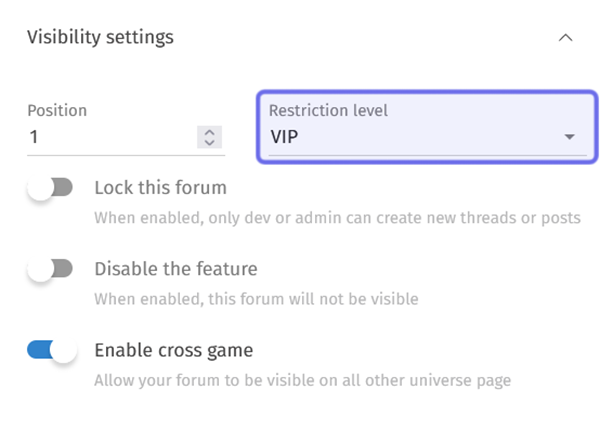
The “Visibility” settings for a new forum are shown above.
The “Restriction level” dropdown is highlighted in purple.
Note: Restriction Levels don’t just apply to individual elements. An entire Universe’s visibility can be controlled by setting a Restriction Level! Restricting a Universe lets you review a Universe internally or give a limited number of community members access before a full release.
The Restriction Levels a user has access to is determined by their role. Each role is associated with one or more Restriction Levels. For example, a Dev has access to most, but not all, of the platform. They have access to the “Dev” Restriction Level, as well as the “VIP,” “Mod,””Member,” “Public,” and usually any custom Restriction Levels. However, they cannot access content with a Restriction Level of “Admin.”
The default Restriction Levels on a G2G platform are listed below from most access to least access:
“Admin:” Admins are authorized to access the “Admin” Restriction Level. “Admin” is always the highest Restriction Level, and Admins have access to the entire platform.
“Dev:” Users assigned the “Dev” role can access all content with a Restriction Level of “Dev,” as well as any content with the Restriction Levels listed below.
“Mod:” Mods can access the “Mod” Restriction Level and any Restriction Levels accessible to Members.
“Member:” All registered users can access the “Member” Restriction Level and all “Public” content.
“Public:” Content with a Restriction Level of “Public” has no restrictions. It can be viewed by all visitors.
Note: Speak to your Account Manager to add a custom Restriction Level.
Even if a user has access to view a given Restriction Level, the actions they can perform may still be limited by the permissions associated with their role. An unregistered user can view a “Public” forum, but cannot create a new thread. Similarly, a registered Member has permission to create new threads, but will only be able to create a thread in a forum accessible by their Restriction Level.