
V1 - Front - Games2gether
All release notes about Major version V1 of Front (end-user interface).
Version V1.5.0 (Minor)
New
Playruo Integration
Playruo can now be integrated into your platform for a given universe to allow players to play a build of your game online, using Playruo technology.
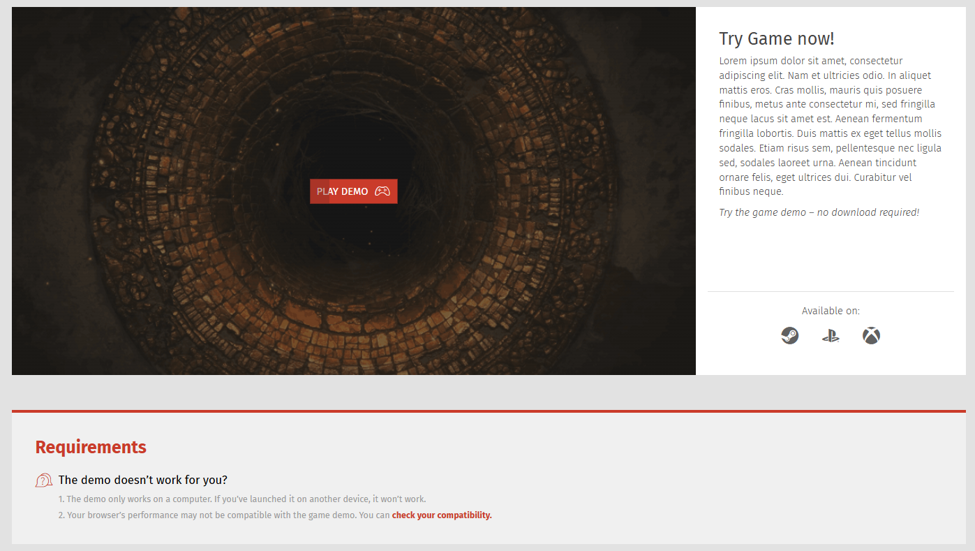
An illustration of a live demo available on your platform.
Contact your account manager for more information on how to integrate Playruo in your platform
Version V1.4.1 (Patch)
Bug fixes 🦋
Creation date: July 23rd, 2026
Mod.io
Fixed URLs changing unexpectedly when navigating within the Mod.io page. (1647)
Version V1.3.5 (Patch)
Creation date: July 1st, 2026
Bug fixes
Bugs
Fixed reproduction steps display on the Bug details page when reproduction steps contained very long text. (1590)
Fixed an issue where clicking the "Unread Bugs" CTA on the Bugs list page redirected users to the first page with the filter still applied. (1621)
Fixed a bug where blank space appeared above the "Save to Draft" button in the Bug creation/edition process after saving a bug to draft. (1653)
Fixed a bug where the "Save to Draft" button did not show a loading state when clicked during bug creation or editing. (1654)
Fixed a bug where users could not return to a previously visited page in the Bugs list (e.g., page 3) after viewing a bug and navigating back to the first page. (1668)
Fixed incorrect tooltip, gauge fill, and percentage calculation on the Bug list upvote gauge. The calculation now correctly displays the percentage as (Upvotes number / Upvotes Threshold number) * 100, and the tooltip now mentions "upvotes" instead of "reproductions". (1669, 1670, 1671)
Moderation
Fixed a bug when the date picker is open blocking scrolling in the moderation panel. (1619)
Forums
Fixed the "Reply to Thread" button being displayed when the forum was set to read-only. (1673)
Ideas
Fixed the displayed browse ideas page after clicking the "Browse All Ideas" CTA from the "Trending Ideas" list on the homepage. (1639)
Fixed the "Mark all as read" button not working on the Ideas followed contents page in the Profile. (1690)
Mentions
Fixed mention information not displayed on hover in the comment. (1666)
Help
Fixed an issue where no filter or sort was applied on the browse questions page when clicking "Browse All Questions" from a list on the Help homepage. (1574)
Version V1.3.4 (Patch)
Creation date: June 2nd, 2026
Bug fixes 🦋
Bugs
Fixed the archive name for files attached to a bug when downloaded. (1633)
Forums
Fixed the pager to prevent navigation from emptying pages in a forum. (1656)
Ideas
Fixed the font size and weight of the Ideas header title on the homepage. (1609)
Fixed an issue where clicking "Browse All Ideas" from a highlighted number card redirected to a filtered browse page. (1640)
Fixed the displayed browse page after clicking "Browse All Ideas" CTA from the “Trending Ideas" list on the homepage. (1639)
Fixed an issue that prevented opening ideas in a new window or tab. (1657)
Fixed a design issue where the wrong icon was displayed in the "Percentage of Ideas Upvoted" highlighted number card. (1641)
Fixed the Ideas homepage to refresh highlighted number cards when switching universes.
Mod.io
Fixed the mod.io page not refreshed after switching between universes. (1643)
Profile
Fixed the missing "Mark All as Read" button on the Ideas page.
Fixed the Steam profile picture display. (1649)
Fixed the notification count at the top of the feed to always display the total number of notifications. (1662)
CMS
Fixed Stretchgoals not visible to anonymous users. (1593)
Text Editor
Reduced list margins to allow for more nesting levels and better display.
Votes
Fixed vote choice counters displayed without colors when a vote contains more than 6 choices. (1646)
Version V1.3.0 (Minor)
Creation date: April 20th, 2026
What’s New ⭐
Bugs Feature
New management capabilities available in this version:
Merge action: Enables merging of Bug reports, reproductions, or comments into another Bug to centralize similar issues and reduce duplicate parent Bugs. Learn more about the "merge" action.
Move action: Allows moving Bugs, reproductions, or comments between categories (and sub-categories) to ensure proper classification and facilitate triage of similar elements. Learn more about the "move" action.
Improvements 🚀
Bugs Feature
Homepage revamp: Redesigned the Bugs feature homepage for improved usability. Users can now view recent activity (new reports, updates) and more easily manage Bugs related to their profile (reports, reproductions, follows). Learn more.
Browse page improvements:
Improved readability and usability with a more relevant progress bar that now displays Bug status above it.
Bug sub-categories are now fully visible in the Bug preview.
Added tooltips on hover of interface elements.
The new Bug preview design is also available in the user profile under Contents > Bugs.
Date data: Modified the date displayed next to a bug report everywhere to consistently show the creation date.
Bug drafts: Disabled the "Save to Draft" button during Bug creation/edition when it should not be possible.
Bug fixes 🐞
Bugs
Fixed occasional console errors triggered when editing Bug comments. (#1403)
Fixed unnecessary text truncation (ellipsis) in Bug previews when enough space was available in the interface element. (#1405)
Added missing right-side border colors in Bug previews for Bugs posted by Devs and VIPs. (#1407)
Fixed an error occurring when uploading multiple screenshots during Bug report creation/editing. (#1430)
Addressed multiple design issues with the Upvote Gauge (#1437, #1438, #1439).
Fixed the Unread Bugs button state not updating when clicked. (#1591)
Fixed screenshot upload errors after a "Save to Draft" action during Bug creation/editing. (#1655)
Fixed visual glitches on the Bugs profile page when adding/removing filters. (#1411)
Fixed loading animation design by removing the grey frame. (#1433)
Fixed default filter behavior: Filters are now deactivated by default on the Bugs profile page (previously all active).
Ideas
Fixed identical icons for different statuses on the Ideas details page. (#1638)
Inbox
Resolved stability issues in the Inbox.
General
Modal: Fixed unnecessary scrollbar display in modals when scrolling was not required.
Auto-scroll: Corrected inconsistent scrolling behavior after posting comments. (#1341)
Navigation: Fixed incorrect tab highlighting in the internal navigation bar when switching pages. (#1436)
Vote
Fixed the Vote button loading animation; it was applied to all Vote buttons simultaneously instead of only the user-selected vote choice.
Version V1.2.1 (Patch)
Creation date: March 9th, 2026
Bug fixes 🐞
Fixed an issue with URL redirection when the URL contains special characters.
Version V1.2.0 (Minor)
Creation date: March 9th, 2026
Improvements 🚀
Ideas improvements
As a Dev or Admin:
Configure the 4 blocks of data on the homepage during Ideas activation or after. Learn more on how to configure the different types of blocks here.
Use the new button available on Ideas details page to be redirect to the back-office page of the Idea.
Add a review by using the new “Add review” button is available on the idea card, clicking on it will redirect to the back office to set a review for the related idea. Learn more about how to add a review here.
As a user:
Reviews of ideas are now visible on the card.
Follow / unfollow an Idea from the card.
Explore Ideas with the new filters available on the Ideas list, learn more here.
Version V1.1.3 (Patch)
Creation date: March 2nd, 2026
Bug Fixes 🐞
General
Fixed the image gallery in comments failing to open. (#1623)
Forums & Contests
Corrected incorrect dates displayed for announcement messages.
Bugs
Resolved an issue where question marks (?) in Bug titles prevented downloading attached files. (#1434)
Fixed inconsistent ordering of game versions in the creation menu compared to back-office settings. (#1583)
Cookies Pop-up
Fixed the Cookie settings pop-up being overlapped by CMS block separation lines. (#1570)
CMS
Fixed cross-universe elements failing to load correctly in News, News & Votes, and Votes blocks. (#1622)
Fixed the page preview feature failing to display correctly when using the "Preview" button.
Help
Fixed the Help homepage's "Browse recent questions" feature not automatically applying the "Recent" filter upon page load. (#1574)
Ideas
Repaired full-screen mode for the Text Editor during Idea creation. (#1479)
Inbox (DMs)
Added missing error messages when sending direct messages without usernames or titles.
Votes
Fixed the loading animation during option voting. (#1479)
Version V1.1.2 (Patch)
Creation date: February 13th, 2026
Bug Fixes 🐞
Forums
Fixed broken link when hovering a thread preview. (#1614)
Version V1.0.1 (Patch)
Creation date: February 6th, 2026
Bug Fixes 🐞
Forums
Fixed broken link on unread threads page when accessing a thread posted in a cross-universe forum. (#1100)
Version V1.0.0 (Major)
Creation date: January 29th, 2026
What’s New ⭐
Angular Upgrade to V18
The platform has been upgraded from Angular 15 to Angular 18. This technical update, transparent to end users, brings major improvements in security, performance, and efficiency.
Here is what is coming with this update:
Enhanced Security, Ensured Robustness
Older versions of Angular no longer receive security patches. By staying up to date, the platform remains secure, robust, and avoids potential exposure to security vulnerabilities of older versions.
Improved performance
Each new Angular versions bring better performance. With Angular 18, pages load faster thanks to technical optimizations like improved server-side rendering (server rendering instead of browser rendering), lazy-loading (iterative loading of page elements) and build processes. The platform will provide a smoother user experience.
Future-proof
This upgrade prepares us for the future. It will facilitate integration of new projects or features, such as the upcoming Design System. It will bring compatibility with the latest tools (Cypress) and browser features. It will allow us to push our usage of the Angular framework with the V18 features.