
Gamification
Gamification on Games2gether (G2G) is a joint effort between the client and the platform.
G2G provides ways to gamify the platform familiar to gamers with incentives tied to common motivations: badges for collectors, unlockable avatars and titles for customization, and a leaderboard that tracks badges and G2G points.
Your studio populates the system in a way that fits your players: avatars of popular characters, badges that reflect the style of your game, and opportunities for the points members have earned to hold real sway (such as the “Votes” feature).
Why gamification?
Gamification lets you reward players who provide good feedback. The rewards you make available to your community gives them a reason to post and to engage with the posts of others.
A core component of the G2G platform, gamification allows you to set up opportunities to recognize community members’ contributions, strengthen their bond with your IP, and to build social bonds through cooperation (upvoting) and competition (leaderboard).
For gamification to be most effective, it is important to create assets and put features in place before launch.
We recommend the following before releasing your platform to the public:
Use specific art direction for visual elements. Creating a consistent look that reflects your content and brand will support your users’ identification with your community and with your games.
Provide milestones for members. Set up ranked badges that unlock rewards as members spend more time with and participate in the community. Consider toggling “Show locked badge” on in the badge properties so that members have something to aim for.
Use your knowledge of your players. Leverage what you know about your players to create gifts and rewards that will appeal to them specifically.
G2G Points and the Leaderboard
Users are ranked on the leaderboard based on either their G2G points or the number of badges that they have unlocked. The leaderboard appeals to competitive players, but G2G points don’t just offer bragging rights—they also represent real clout on the platform.
When a user upvotes content or casts a vote, their G2G point total is added to the upvote or vote total. Vote and upvote totals are used to judge the popularity of content, sort content, and even decide the winners of votes and contests.
Note: G2G points are not a consumable resource. If a user has 2,500 G2G points, they will add that to the upvote or vote total each time they upvote a new piece of content or participate in a new vote.
Community members earn G2G points by unlocking badges. Set up badges that award G2G points for engagement to create a positive reinforcement loop: the more a user participates in the community, the more weight their upvote has.
Badges
Badges are multifunctional. They don’t just spruce up a profile; unlocking badges can award G2G points and unlock gifts and rewards.
We recommend having a variety of badges before launch. To help you plan, we’ve described some badge types below and provided examples. Feel free to use these examples on your own platform.
Badges can be manually unlocked or unlocked automatically by setting up badge quests. You can also batch unlock badges for a group of users.
Identification
Badges can be used alongside role tags to identify community members.
These badges can be the same as a Role, or can relate to an identity or function that isn’t represented by a Role. Examples include “Admin,” “VIP,” and “Creator.”
We recommend creating identification badges that are awarded manually and do not award G2G points.

An example “Dev Team” badge featuring animation
Customization
Motivate users to customize their profiles by setting up badges that award G2G points when certain customization tasks are first completed.
Several badge quests allow you to automatically award badges related to titles, avatars, and profile customization. Set these badges to award G2G points to further encourage users to distinguish themselves with a new avatar and title.
These badges can be set up as ranked badges that give additional rewards for completing multiple related quests. Find further information about ranked badges below.
Suggested Badges
Profiler: a user’s first badge, unlocked on account creation. Unlock additional ranks by adding badge quests for selecting an avatar, adding a description, or selecting favorite badges.
Collector: rewards users for unlocking titles. You can set up a ranked badge that continues to reward users as they unlock more and more titles.
Shapeshifter: rewards users for unlocking avatars. You can add ranks to this badge to reward users as they unlock more and more avatars.
Engagement
Encourage users by creating badges that unlock when the user participates socially, such as by answering questions and upvoting. Rewarding community participation motivates users to register and contribute on the platform. Awarding G2G points for these activities creates a positive feedback loop.
Ranks can be added to most of the badges suggested below by adding quests with increasing upvote thresholds.
Suggested Badges
Mentor: rewards users when a tutorial that they posted is upvoted. This badge requires the “Tutorials” feature to be activated.
Producer: rewards users for participating in community votes. This badge requires that the “Votes” feature is activated.
Influencer: rewards users when other community members follow threads that they have created.
Writer: rewards users when other community members upvote threads that they have created.
Editor: rewards a user when their thread is stickied by an Admin or Dev.
Inventor: rewards a user when an idea that they posted is followed by other community members. This badge requires the “Ideas” feature to be activated.
Catalyst: rewards a user when an idea that they posted is upvoted by other community members. This badge requires that “Ideas” feature to be activated.
Game Changer: rewards a user when the review status of an idea that they submitted is updated to “Implemented.”
Facilitators: rewards a user when a question that they have shared using the “Help” feature is followed by other users. This badge requires the “Help” feature to be activated.
Investigator: rewards a user when a question that they have shared is upvoted by other community members. This badge requires the “Help” feature to be activated.
Helping Hand: rewards a user when an answer they posted in the “Help” feature is given a thumbs up by another user, indicating that the answer was helpful.
Smarty-pants: rewards a user when an answer they posted in the “Help” feature is marked as the “best answer."

An example image for the “Producer” badge
Gameplay
You can create badges directly related to your game, including for getting in-game achievements and attending events.
If your game is available on Steam, there are several badge quests available, such as badges that unlock when a user owns specific content. You can set up a ranked badge that rewards a player for owning the base game and unlocks additional ranks for owning DLC. You can also set up a badge with quests related to specific Steam achievements.
Note: A user must have linked their Steam account in order to unlock badges related to owning games and Steam achievements.
Any time you provide a new opportunity to players to engage with your game, consider adding a related badge. Add badges that align with announcements about new games, game releases, and DLC releases
Limited Time
You can plan ahead to have badges available for a limited time. Limited time badges are a great way to recognize community members who participate in contests and events.
Contact your Account Manager for help setting up a badge that rewards users who log in during a certain span of time. First, create a badge with the “Login” badge quest. Then, the G2G team will set the length of time.
You can also manually manage a limited time badge by setting up a badge quest on the first day of an event, and deleting it on the last day. For example, if you want to reward players who sign up in the first month your G2G community is live, create a badge with the “Register” badge quest before release. Then, delete the quest on the last day of the month. The badge will remain live, but users will no longer be able to unlock the badge.
Note: Do not delete the badge itself, or it will no longer appear on member’s profiles.
Ranked Badges
A badge can have up to eight ranks. The number of ranks a badge has is determined by the number of badge quests associated with the badge. Users unlock badge ranks based on the number of badge quests that they have completed. Badge quests are independent from one another, but you can set up badge quests so that the quest for a lower rank is a prerequisite for a higher one.
Note: A different image can be added for each badge rank. Incorporate this progression into your badge design!

A series of badge ranks showing visual progression
The “Profiler” badge suggested above can be expanded to award additional ranks when users complete other account creation tasks. We recommend including the following badge quests:
Creation - On account creation
Profile completion - When a user completes their profile (avatar and title)
Profile completion - When a user complete their profile (signature and description)
Favorite badges - When the user chooses favorite badges
This badge unlocks when a user creates an account, so the “Creation” quest will always unlock the bronze rank. The other quests are not prerequisites of each other, so the completion of additional badge quests will unlock the next highest rank. The user adding an avatar and title or a user adding a signature and description could unlock the Silver rank, depending on which they do first.
A ranked badge that uses the same quest with a numerical unlock criteria, such as the “Survivor” badge shown below, will have ranks that must be unlocked in a specific order. Because the same quest is repeated with an increasing unlock criteria, the quests will always be unlocked in the same order (unless manually awarded).
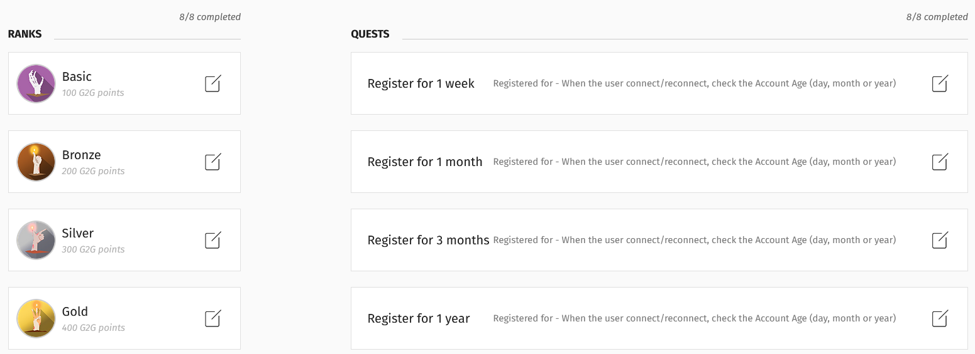
The “Survivor” badge uses the “Registered for” quest. Set increasing lengths of time by adding larger numbers in the “Unlock criteria” field for each successive quest.
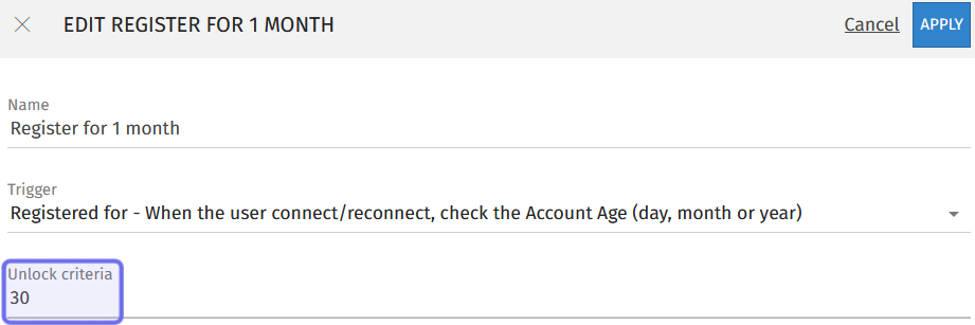
The side panel to add a new badge quest is shown above.
The “Unlock criteria” field is highlighted in purple.
For ranked badges with numerical unlock criteria, you can add badges aimed at your most engaged community members. For example, you can add a “Supreme Survivor” badge for users who have unlocked all ranks of the “Survivor” badge that unlocks at still increasing numbers of years registered.
Gifts and Rewards
Gifts and rewards on G2G provide opportunities to incentivize, reward, and strengthen connection with your players. Build a strategy around the goals you hope to meet by offering rewards to your players. You could create an avatar earned by members with high participation and offer a digital comic to all registered users. Get the most out of gifts and rewards by varying the types and the conditions under which they are awarded.
Consider the following when adding rewards and gifts to the platform:
What is offering this gift or reward intended to do? For example, are you acknowledging players who have contributed a lot to the platform with a rare title? Are you hoping players register by offering digital content? Are you rewarding player loyalty by giving an in-game item to players who have been registered for over a year?
What player motivation does this gift or reward speak to? Understanding what motivates your players can help you decide which rewards to offer. For instance, rare titles and avatars will appeal to collectors and some competitive players. A digital comic will draw in story-driven players.
How does the reward need to be provided in order to meet the objective? Make sure you identify and implement what is required for the reward to be given to players as intended. Link rewards to badge quests to create prerequisites, such as being registered for a certain amount of time.
Rewards: Avatars, Titles, Points
Avatars, titles, and G2G points are tied to badges and unlocked as badge quests are completed. These rewards are central to the way that gamification on G2G operates.
The default reward when a user unlocks a badge is a set number of G2G points. If G2G points are toggled on for an unranked badge, users will be awarded 2,000 G2G points when that badge is unlocked. A user can earn up to 5,300 G2G points for a fully ranked and unlocked badge.
Add avatars to inspire users motivated by customization to complete badge quests. Use avatars derived from your properties, such as game personas, to strengthen your players’ connection to your game and its lore.
Create titles for members to add under their username after earning certain badges. Users can further customize their title by combining two titles that they have unlocked.
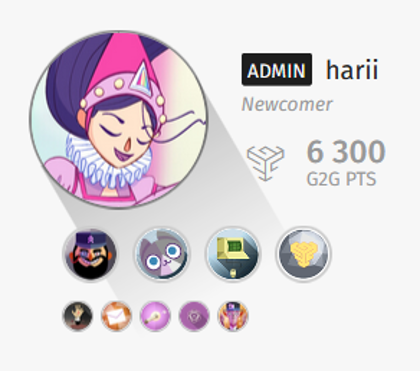
An example of a customized avatar and badges as seen in a forum post
Gifts: Comics, DLC, Drops, and Digital Extras
Gifts are a type of reward that can be used off of the platform. This type of reward is a good chance to make the most of the resources that you’ve already dedicated to creating a game environment with a cohesive vision.
You can use existing assets, such as character art and the soundtrack, or build on existing work to create gifts that appeal to your players. For example, Amplitude added levity and fostered community by releasing a series of “Endless Drinks,” cocktail and mocktail recipes that were peppered with in-jokes and references to the Endless universe.
There are three types of gifts:
Comics are downloadable .pdf or .zip files.
A game reward is a gift that can be redeemed externally and works in concert with your game. For example, a game reward could be a Steam code to access DLC or an in-game cosmetic provided via the G2G “Inventory” service.
A digital extra is any other downloadable reward, such as wallpapers.
Gifts can optionally be linked to a badge to reward players when they unlock that badge.