
Gathering Community Feedback
Games2gether has five features that help you gather feedback from your community: Forums, Bugs, Ideas, Votes, and Contests. These features provide tools to craft experiences with your community from creating a vote to get player feedback on a design in pre-production to identifying pain points after release using the “Bugs” feature.
With these features, you can invite players to share their open-ended impressions about and reactions to your games and collect more structured feedback to improve or guide game elements.
Keeping the following points in mind will help you get the most out of community feedback:
Be prepared. Engaging with your community is invaluable, but it is also time-consuming. Before activating a feature, assess the capacity of your team to engage with, moderate, and manage comments. Make sure your team is aware of their responsibilities and understands how they should conduct themselves when interacting with the community. You can add a dev hint on G2G to remind Admins and Devs of the dos and don’ts.
Be active and responsive. Once you open a communication channel with your players, make sure to regularly acknowledge and respond to what they’re saying. Be open and honest, even if that means disappointing someone. It’s okay to admit something is not within scope! If players feel heard, they will keep speaking.
Be open to all feedback – positive and negative. It feels great to hear what players love, but it’s also important to listen to their frustrations. Anticipate what you might hear and be ready to hear it. Thank players for constructive criticism and avoid getting into a back-and-forth. If there is abuse, moderate appropriately.
Be ready to say “no.” You won’t be able to tell everyone what they want to hear. Players may have requests that are outside of your capacity, vision, or scope. Don’t avoid these comments; you want players to speak their minds! Instead, let them know it isn’t possible and, if you can, briefly explain why. It is useful to think of some possible scenarios and responses in advance so you are ready to reply promptly when this situation arises.
Let your community know that you want to hear from them! The best way to hear from as many different players as possible is to invite them to speak up. Ask for feedback and direct players to the right channels.
Reward active community members. Thank your community for their feedback. Acknowledge community contributions in news posts and offer gifts and rewards for participation. Use back office analytics dashboards to identify top contributors and invite them to contribute earlier in the game development process.
These points apply to all kinds of community engagement, but each G2G feature has its own purpose and approach. Choose which features to activate based on the type of engagement you hope to foster and how you plan to use community feedback.
Forums
The “Forums” feature creates an open space for your community to converse with each other and with your team. When setting up your forums, take steps to ensure community members can easily find discussions and feel comfortable participating in them.
Set up a forum structure that is easy to navigate. A community member’s first interaction with your forums is how they are organized. A clear structure allows you to guide players to relevant information and to signal what sorts of discussions fit the space. This then makes it easier for your team to use their time on the platform efficiently by ensuring they can quickly and reliably find useful feedback.
Communicate a clear conduct policy. Laying out clear standards of behavior is the first step towards building a space where all players can participate freely without fear of harassment or ridicule. Have a written, accessible community code of conduct. Make sure members are aware of the expectations for behavior, the options for reporting and blocking other users, and the consequences of violating the code of conduct.
Enact robust moderation. Admins, Devs, and Mods should know the tools they have available to moderate content on G2G. A well-moderated space gives players the confidence to engage and to speak their mind. It is important to actively and consistently weed out spam and abusive or inappropriate comments in threads. Players who feel welcome are more likely to share their insights and to stick around.
Forums can be a powerful addition to your outreach and communications strategy. They are a good opportunity to present different facets and faces of your studio.
Implement a process for sharing information. Once your community starts sharing feedback, you need to get that feedback to the people who can use it. Make a plan for how you will process, prioritize, and forward relevant information to the production teams. This is especially important for the “Forums” feature, which allows for more open-ended input than features like “Bugs” or “Votes.”
Share your team’s diverse points of view. A community needs a range of participants and viewpoints to thrive. That isn’t only true for your audience – it is true for how you represent your studio, too! Ask team members from all parts of the development process – producers, artists, coders, narrative designers – to weigh in. Forums are a venue for organic communication, without the intermediary of patch notes or a newsletter.
The key word is communication.
Be present and engage. When your community feels listened to, they will keep speaking and offer more insight into what your players are thinking. Encourage your team to comment in the forums. Team members can acknowledge opinions, provide an update about a topic, or explain why a request isn’t feasible or not part of the game vision or strategy. Provide the guidance your team needs to be effective participants including how to handle negative comments, how much detail to provide, when to intervene with moderation tools. Add a dev hint as a quick reminder for team members.
Spark conversation. Don’t wait for community members to start a discussion. If you want to hear from players on a specific topic, ask! Sometimes you just need to kick-off a topic for your players to offer a compelling, constructive discussion.
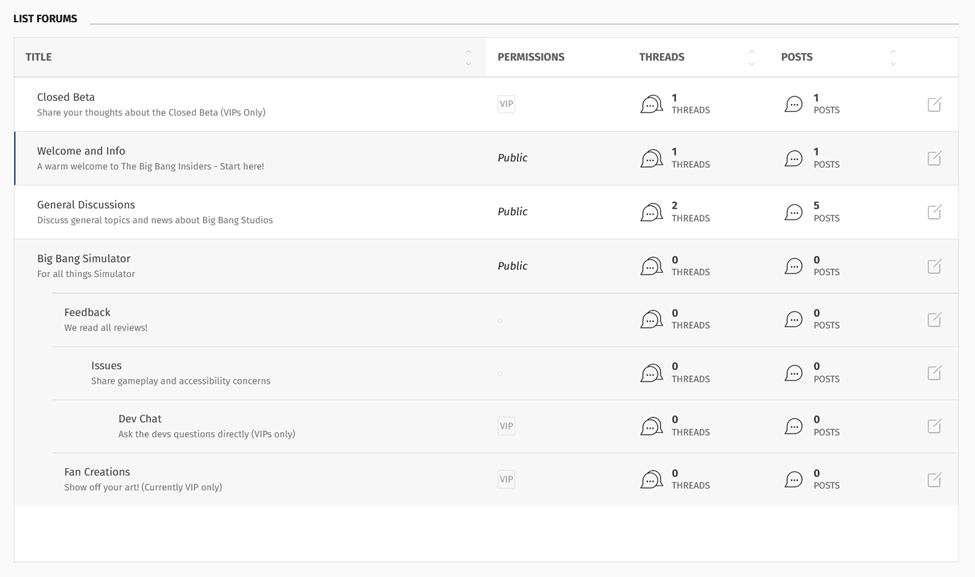
An example of forum organization as shown in the back office.
Bugs
The “Bugs” feature is a public repository of known issues that your team and your players can contribute to. Activating this feature lets players know that their reports matter and helps you provide support.
Activate the “Bugs” feature on game launch. Players need a place to report issues as soon as they arise. The “Bugs” feature offers a single hub for player-submitted issues with ways for you to provide step-by-step guidance on how to make a report. Activating this feature on day one allows your team to locate and follow up on reports in one place.
Use Game2gether’s tools to prioritize reports. Set an upvote threshold in the back office to help your team identify which bugs players encounter most frequently. Choose a threshold appropriate for your community. Extreme thresholds, like one or 999, won’t help you prioritize. Difficult to meet thresholds, like setting the threshold to 100 when an average bug receives 50 votes, risks making your community feel unheard and discouraging use.
Integrate the “Bugs” feature with your internal QA processes. Have the “Bugs” feature support your existing process for identifying and resolving bugs. Determine how the bugs reported on G2G will fit into your internal system for flagging, tracking, prioritizing, and escalating bugs before activating the feature. The dev follow-up options include a field to include a ticket URL to assist your team in linking player bug reports with a ticketing system. This URL field is not visible to most users on the front end.
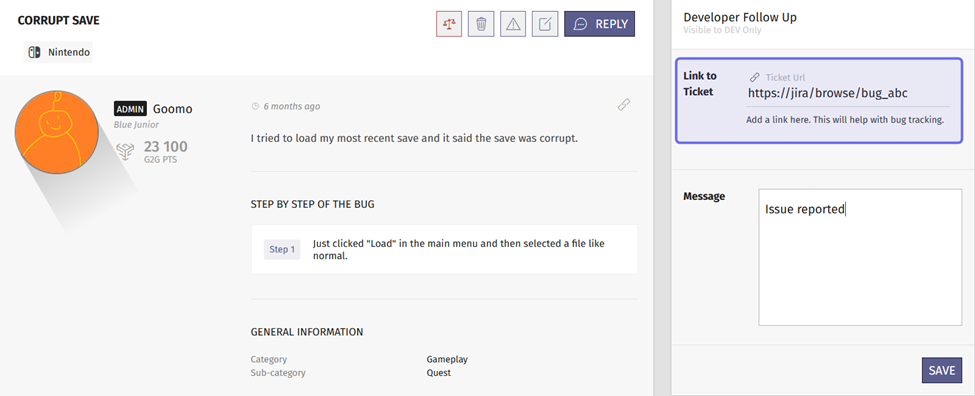
A front-end bug report is shown above. The “Developer Follow Up” options are on the right. The field where Devs can add an external ticket link is highlighted in purple.
Players who report bugs enjoy what you delivered enough to take the time to help make it better. You’ll get the most out of player reports if you clearly communicate what information is most useful and let players know that you value their part in the process.
State what you need from players. Guide and encourage players to use the “Bugs” feature as intended. When you set up your report process, write descriptions that clearly explain what information is needed for your team to promptly and efficiently address their report. Some steps may need additional explanation, such as outlining useful game files to include. Point players to other options available in the “Bugs” feature and let them know when they should reproduce a bug, leave a comment, or upvote.
Direct players to the “Bugs” feature in-game. Make it easy for players to find where they can make a report by directing them to the “Bugs” feature off the platform. For example, it's a good idea to have a report button in-game that redirects to G2G.
Work through reports in a timely manner. Bugs are a source of frustration for players. Communicating with players mitigates this frustration and helps retain players. Update the status as you investigate and work on resolving a bug. Making your team’s efforts visible reassures players that you take their concerns seriously.
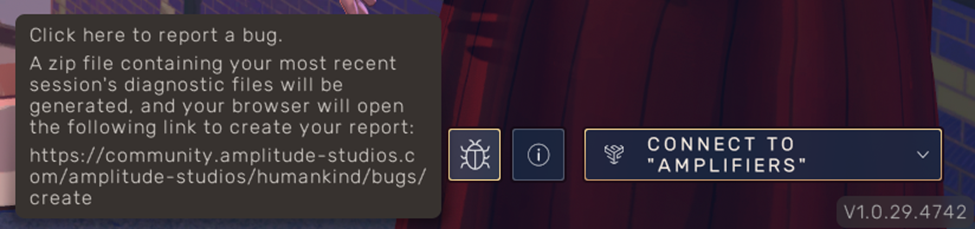
The game menu shown above directly links to the “Bugs” feature. A tooltip on hover communicates where the button redirects to and what information will be shared.
Ideas
G2G’s “Ideas” feature provides tools that unlock your players’ ingenuity. It gives you a way to collect, respond to, and track your community’s wishes and what ifs. The feature’s search helps other players add their own voice by replying and upvoting.
You can activate the “Ideas” feature at any point during your development process. It can be used to collect demo feedback, as part of an Early Access strategy, to ask for requests for future updates, and more.
Before you activate the “Ideas” feature, it’s important to be sure you have the capacity to respond to your community’s ideas. If you invite players to speak, they need to know that you are listening.
Provide clear guidance and manage expectations. Let players know how they should use the feature and what they can expect when they submit an idea. You want to build an “Ideas” feature that focuses on quality, not quantity. Make clear that not all suggestions can be implemented. Set up categories relevant to the players and to the type of feedback you’re looking for. Avoid unfamiliar acronyms and industry terms. Encourage your community to search for and upvote existing ideas.
Communicate how the “Ideas” feature is used to the whole community. Include ideas in other communications, such as news and patch notes. This gives you a chance to celebrate community engagement and acknowledge your players. Filters, graphs, and search options in the back office can help you find good ideas to highlight. Grab a few quick wins that are easy to implement to show that things are moving forward.
Engage with submitted ideas on a regular basis. Your team’s participation is key to the feature’s value. Review and respond to ideas promptly. Update idea statuses with a comment to keep the discussion alive.
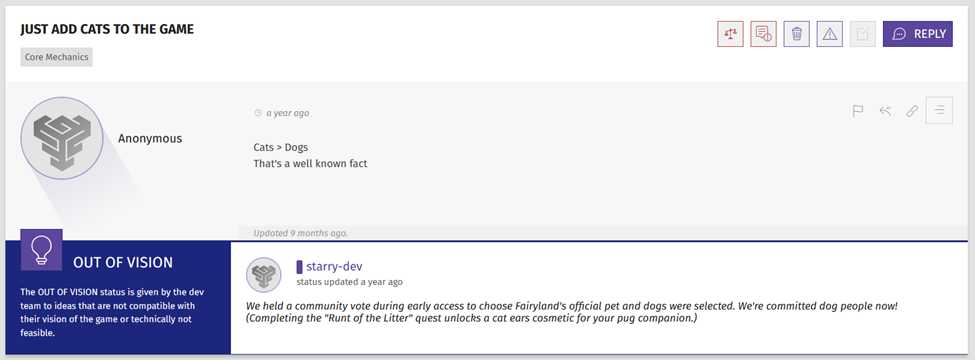
A Dev has marked the idea above as “Out of Vision.” They included a short explanation and alternative for the player.
Votes
The “Votes” feature is a tool to ask for direct feedback that is weighted towards your most engaged community members.
A vote can be any question with multiple-choice answers. It can be posed at any point in the development process. You can ask for feedback on in-game cosmetics, out-of-game rewards, gameplay preferences, etc.
Consider the following points to make the most of the “Votes” feature:
Know what you’re looking for. Pose a question that will return the responses you need to take the action you intend. When you create your vote, use the response option that gives voters all of the information they need to make their choice. The “Picture” vote type likely provides enough information for players to choose their favorite cosmetic. For a poll about a narrative or character choice, the “Text content” vote type has space to add context that can prevent misinterpretation.
Clearly communicate the purpose of a vote. Make sure your community understands what impact their vote will have and what the stakes of the outcome are. This provides incentive to participate, and can also avoid disappointment or misunderstanding.
Keep in mind that the “Votes” feature isn’t set up as one user, one vote. A member’s impact on the vote is determined by their G2G points.
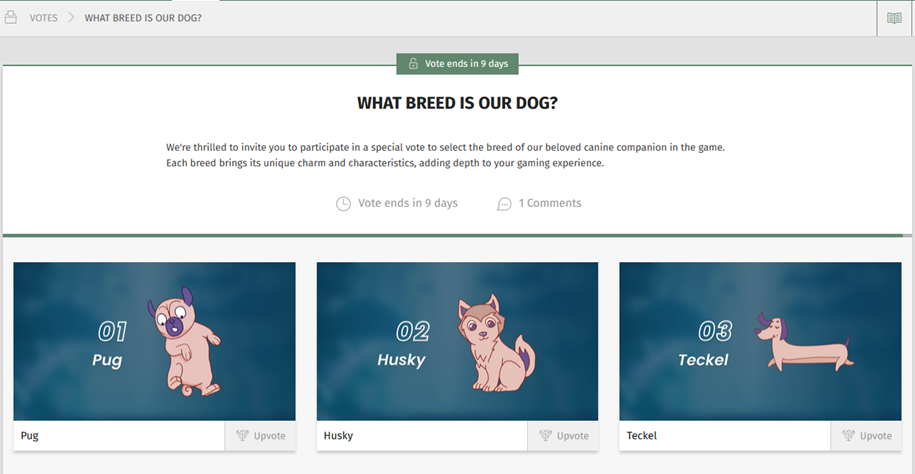
An example of a vote asking for feedback on a cosmetic, in-game element.
Contests
The “Contests” feature allows for direct audience participation with a range of ways to engage. A contest works well when you want to solicit input from the community and determine a winner based on upvoting and G2G points. The “Contests” feature can also be used to manage competitions, even when upvoting is not used to determine a winner.
Lay out all the details. Outline any requirements or restrictions for a submission. Provide instructions detailing the submissions process.
Encourage participation, even without a submission. Make sure your community knows that they can participate in a contest without submitting their own entry. Explain additional ways to engage with contest entries and whether upvoting will be the method for determining a winner.
Communicate how contributions will be used. Make sure entrants know if their submissions will be used to create game content, whether the winner will receive any rewards, or whether this is a friendly competition.
We recommend including all of the above information in a contest’s introductory post.
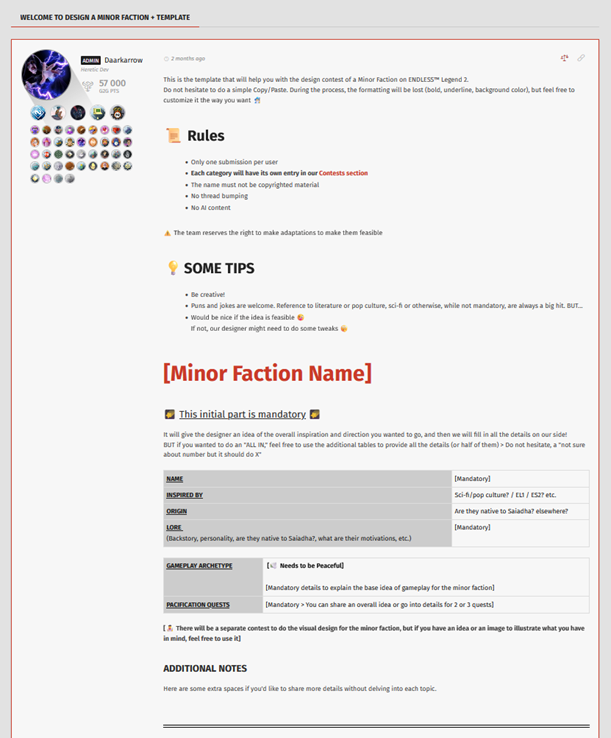
An example of a contest introductory post that includes rules, tips, and a submissions template.